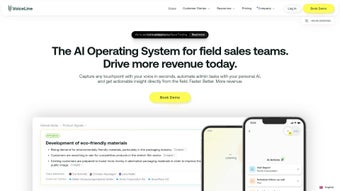

Download VoiceLine – AI‑Powered Voice Note Management
VoiceLine is a next‑generation AI‑driven voice note manager that turns spoken messages into actionable data. By capturing short, 60‑second recordings and instantly converting them into accurate transcriptions, the platform eliminates the friction of traditional text‑only communication. Whether you’re updating a CRM, adding a comment in a project‑management board, or simply sharing a quick idea with a teammate, VoiceLine creates a searchable, editable text version while preserving the original audio. The service is built with GDPR compliance, a 14‑day free trial, and cross‑platform accessibility for Windows, macOS, Android, and iOS, making it a secure, flexible solution for remote teams that want to reduce meeting overload and boost knowledge sharing.
Core Features, Benefits & Compatibility
VoiceLine’s feature set is focused on speed, clarity, and integration. The AI engine performs real‑time transcription with a reported accuracy of 96 %, even in noisy environments, thanks to built‑in noise‑cancellation. Once a note is recorded, the text is automatically highlighted, allowing users to click any word to jump to that exact moment in the audio – an interactive text navigation that speeds up review and editing.
Customizable vocabularies let businesses add industry‑specific terminology, ensuring that acronyms, product names, or slang are captured correctly. Summarization technology condenses longer discussions into bite‑size bullet points, making it easy to extract key decisions without replaying the entire clip. All notes are stored in a centralized hub that can be filtered by project, date, or tag, providing a single source of truth for asynchronous notifications.
VoiceLine integrates natively with popular CRMs (Salesforce, HubSpot) and project‑management tools (Asana, Trello) via secure APIs, so a voice note can be attached directly to a lead or a task without leaving the workflow. Compatibility is a core strength: native desktop apps for Windows 10/11 and macOS 12+, plus mobile apps for Android 8+ and iOS 13+, ensure that users can record and retrieve notes on any device. The platform adheres to GDPR standards, encrypting data at rest and in transit, and offers role‑based access controls for enterprise environments.
- Automatic, high‑accuracy transcription with AI‑driven noise cancellation.
- Interactive text navigation – click a word to jump to that audio moment.
- Customizable vocabulary for industry‑specific terms.
- AI summarization that produces concise bullet‑point overviews.
- Centralized hub with tagging, filtering, and search across all notes.
- Seamless integration with Salesforce, HubSpot, Asana, Trello, and more.
- Cross‑platform support: Windows, macOS, Android, iOS.
- GDPR‑compliant encryption and role‑based access controls.
- 14‑day free trial with no credit‑card required.
- Limit of 60‑second recordings to encourage concise communication.
Installation, Usage, Pros, Cons & Frequently Asked Questions
Getting started with VoiceLine is straightforward. Visit the official website, choose the appropriate installer for your operating system, and download the .exe (Windows) or .dmg (macOS) file. Mobile users can find VoiceLine in the Apple App Store or Google Play Store.
After launching the installer, follow the on‑screen prompts to create a secure account – you can sign up with an email address or single sign‑on via Google or Azure AD. Once logged in, the dashboard greets you with a “Record New Note” button. Click it, speak into your microphone for up to 60 seconds, and watch as the AI instantly generates a transcription underneath the waveform.
You can edit the text, add tags, or attach the note to a CRM record by selecting the appropriate integration from the dropdown menu. The app also supports batch uploads, allowing you to import previously recorded audio files for retroactive transcription.
Overall, VoiceLine delivers a compelling blend of speed and intelligence, but there are a few trade‑offs to consider. Below is a balanced snapshot of its strengths and limitations.
- Pros
- Lightning‑fast transcription and summarization reduces meeting time.
- Interactive navigation bridges the gap between audio and text.
- Custom vocabularies keep industry jargon accurate.
- Robust integrations embed voice notes directly into existing workflows.
- Cross‑device sync ensures notes are always accessible.
- GDPR‑compliant security protects sensitive information.
- Free trial lets teams evaluate without financial risk.
- Cons
- Recording limit of 60 seconds may feel restrictive for longer explanations.
- AI transcription, while accurate, can still misinterpret strong accents.
- Advanced features (custom vocab, API access) are only available on paid plans.
- Desktop apps require Windows 10/11 or macOS 12+ – older OS versions are unsupported.
Can VoiceLine transcribe multiple languages?
Yes. VoiceLine currently supports English, Spanish, French, German, and Mandarin. The language can be selected in the settings before recording, and the AI will apply the appropriate model for optimal accuracy.
Is there a limit to how many notes I can store?
The free trial provides up to 500 notes. Paid plans offer unlimited storage, with tiered pricing based on the number of active users.
How does VoiceLine ensure GDPR compliance?
All data is encrypted both at rest and in transit using AES‑256. Users can control data retention policies, and the platform provides data‑export and deletion tools to meet GDPR’s “right to be forgotten” requirement.
Can I integrate VoiceLine with my existing project‑management tool?
Absolutely. VoiceLine offers native connectors for Asana, Trello, Monday.com, and also provides a RESTful API for custom integrations, allowing you to attach voice notes to any task or ticket.
What happens after the 14‑day free trial ends?
Your account will transition to a read‑only mode unless you upgrade to a paid plan. All existing notes remain accessible, and you can export them at any time before the trial expires.
Conclusion & Call to Action
VoiceLine bridges the communication gap that many remote teams face by turning brief spoken updates into searchable, actionable text. Its AI‑driven transcription, interactive navigation, and seamless integrations make it a powerful ally for anyone looking to cut down on endless meetings and improve knowledge capture. While the 60‑second limit encourages concise messaging, it may require users to adapt their communication style.
Nevertheless, the security guarantees, cross‑platform availability, and generous free trial position VoiceLine as a leading solution in the voice‑note management space. Ready to experience a smarter way to collaborate? Download VoiceLine today, start your 14‑day trial, and watch your team's productivity take flight.
VoiceLine ReviewVoiceLine shines with its fast, accurate transcription and thoughtful integration options. The interactive text navigation and AI summarization are standout features that truly boost productivity. Although the 60‑second recording cap can feel limiting for complex topics, the overall security, cross‑device sync, and GDPR compliance make it a compelling choice for modern, distributed teams.



.png)



